


We all know Amazon as the top online shopping site to buy anything and everything. However, there are many top Amazon Services we are not aware of. This article will discuss about Top Amazon Services You must know viz Amazon message center, Digital Credit, APO Orders, Cart to Word, etc.
How to use Amazon Services for Online Shopping
Shopping on any online site is similar to shopping in a supermarket. Search the item you are looking for, add it to the cart, check out and your order is delivered. Amazon is an international company that started as an online bookstore. Shopping through Amazon online services is definitely a boon in this pandemic.

Fig. 1 – Introduction to Amazon
For a beginner, follow the steps mentioned below to shop online:
- Log in to your account.
- Go through the different units and find your category. Click on the category.
- When you find the product you want, select it.
- After selecting, review the item and click on Add to Cart.
- Then select Proceed to Check out. Here you need to add your shipping address, the address where you want your product delivered.
- After adding the shipping address, click Continue. After adding the shipping address, you will need to select the shipping speed. If you want your product delivered faster, you will need to spend more.
- After selecting the Shipping speed, click Continue.
- You will be taken to the payment page, select the mode of payment and click Continue.
- On the next screen you can check your order and make any changes if necessary and click ‘Place Your Order’. This will take care of your order on Amazon.
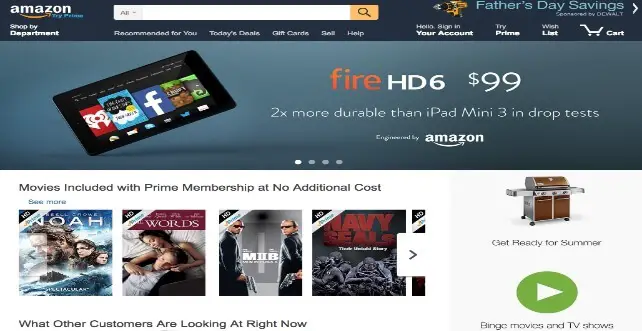
Fig. 2 – Amazon Webpage
What is Amazon Cart
Amazon Cart is a temporary shopping basket to stock a list of orders. The shopping cart reflects each order’s most recent price. You can park your items here before you make the final decision to buy the item.
How to Export Amazon Shopping Cart to Word Document
With a personal copy, it is always easy to review your wish list without logging in to the app. To export, we need to login and reach for the Amazon shopping cart. In the shopping cart, right click on any blank area and click Select All to select all the items you want to export to word. Once the items are selected click copy and paste it to the already opened Microsoft word. Here most of the items are copied with both text and images.
One more option to export is to convert the web page into pdf format and then convert pdf format into Microsoft Word format. The format will not be like the webpage, but it looks better than direct copy and paste option.
How to Order for APO Address Using Amazon Services
APO Address stands for Army Post Office address used by the US Military Postal Service to hand over mail and packages to military crew. It is associated with the US Army and the Air Force. There are some extra considerations when you book with an APO address. Firstly, you need to check if the item is eligible for APO shipping. There is a list of items, which cannot be shipped to APO. They are apparels, cellphones, cameras, electronics, health and personal care, lithium batteries, standalone lithium batteries, lithium batteries along with electronic equipment, etc.
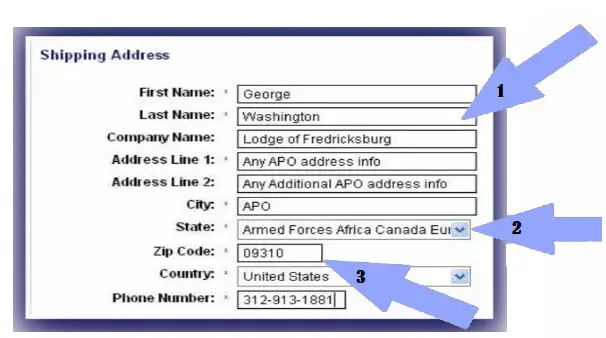
Fig. 3 – Steps to Order for APO Address
After entering the address, if your order is not eligible for shipping, you will be prompted with an error message at checkout. The eligibility of the product to be shipped can be checked at the product detail page. To ship an order that is eligible, you need to set the City to APO, type the State/Province/Region to AA, AE, or AP, and type the Country/Region as “United States”. These deliveries may take up to 21 business days for delivery.
How to Respond to Amazon Messages
To respond to messages, we need to access the Buyer-Seller Messaging Service also called as Amazon Message Center. It is a messaging service to connect with buyers/ sellers.
Amazon Message Center
This is one of the Top Amazon Services. To access the Message Center, we need to:
- Login to Amazon.com.
- After logging in, you find three horizontal lines on the left corner, click on that.
- After clicking on that, go to Your Account.
- Under Your Account menu, you will find the Message Center.
- Under the Message Center tab, you have two options – Your Messages and Deal Notifications.
- When you click on ‘Your Messages’, you will find options of All Messages, Buyer/Seller Messages, and Sent Messages. This option allows you to connect with the seller regarding any query about your order. You can check all your previous communication with the sellers. You can also attach attachments about your query to the sellers.
- Under Deal Notifications, you will find the latest deals available for you.
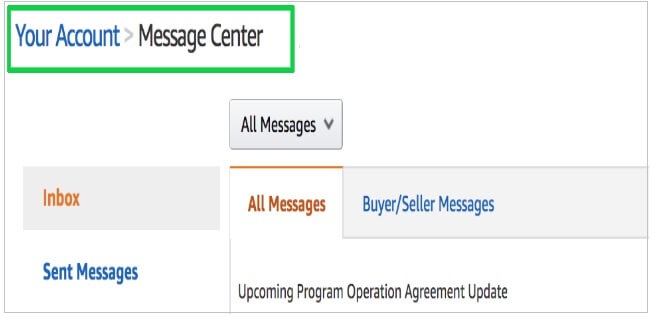
Fig. 5 – Buyer/ Seller Messages Using Amazon Services
Amazon Order History
This tool provides you all the details of your Order. It includes details of the product ordered, time, vendor, order history and the payment system. It also allows you to see the return and refund details if any. You can access your Order history on the tab “Your Ordersâ€.
Login to your account and on the right-hand side you will find the tab Your Orders. You have a filter option which allows you to filter by Order type and time filter. Order type allows you to filter orders from not yet shipped and cancelled orders. Time filter allows you to filter it from the last 30 days to the last five years.
Can you Delete your Order History on Amazon
This is sadly no, but there are ways to hide your orders. You can archive selected orders. Login to Amazon.com. Go to Your Orders and select the order you like to archive. Select Archive Order. This option is not available on the app and is only available on the desktop login. Once selected, the order history will be removed from default order history. It can be viewed any time from the View ‘Archived Orders’ tab.
Amazon Digital Credit Services
Amazon Services gives digital rewards to all its Prime members when they choose to get an order delivered with no hurry. To avail Amazon Digital Credit Services, you need to select No-Rush Shipping at checkout. Once you choose No-Rush Shipping, the shopping portal provides two offers, either an instant discount, which is immediately applied to the present order or will offer a reward to your account after your order has been shipped. An email will be sent to your registered e-mail ID with the details of the rewards.
These rewards can be applied to orders which indicate the same during checkout. These rewards can be used to buy digital products such as digital music, eBooks, Kindle, video downloads and apps at Amazon Appstore. There will be an expiry date to the Digital Credit, and it will be mentioned in the email where other information of the reward is available. Digital Credit is offered only to the Prime members.
How to Check Digital Credit Balance via Amazon Services
Follow the mentioned steps to check Digital Credit balance:
- Enter the login credentials on the webpage or app.
- Go to the Credit Redeem Page and click it.
- After you click on the Credit Redeem Page select Enter Your Code.
- This button will show you a list of all your credit balances.
- Visit the No-rush Credit links and you can check your No-rush Reward Balances and the expiry date of the rewards.
- The link shows the balance of both Digital Rewards and Prime Now Rewards.
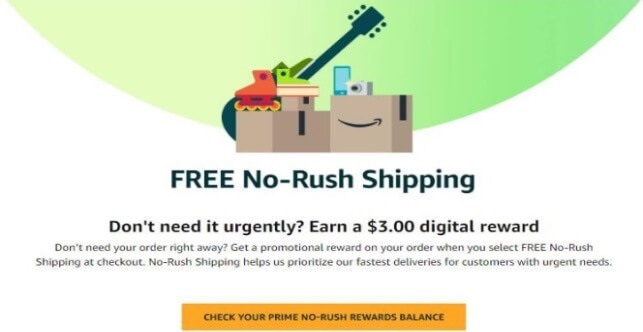
Fig. 4 – No-rush Credit in Top Amazon Services
How to Add to an Existing Amazon Order
There is no feature to add an order to an already existing order, but you can place another order and Amazon combines the order even though you have ordered separately.
There are a few shipping orders, which allows you to consolidate your orders and they are:
- Amazon Day Delivery
- Fewest Possible Packages
Amazon Day Delivery
You can choose Amazon Day Delivery option while checking out to select a particular day of the week and have all your orders delivered on that particular day.
Fewest Possible Packages
If you choose this option at checkout, Amazon Services combines all the orders arranged to be delivered that day.
Also Read:
Microsoft Mouse – Features, it’s Types, How to Reset Wireless Mouse
Chegg Books – How to Rent & Return Chegg Books, Pause Subscription
Best Apps For Sleep Music – Get A Relax and Peaceful Sleep
Thank you for your sharing. I am worried that I lack creative ideas. It is your article that makes me full of hope. Thank you. But, I have a question, can you help me?
Hello, Neat post. There’s a problem along with your web site in internet explorer, may test thisK IE still is the market chief and a big component to folks will leave out your fantastic writing because of this problem.
Your article helped me a lot, is there any more related content? Thanks!
Loving the information on this site, you have done great job on the posts.
Great post. I am facing a couple of these problems.
I’ve been surfing online more than three hours today, yet I never found any interesting article like yours. It is pretty worth enough for me. In my opinion, if all site owners and bloggers made good content as you did, the net will be a lot more useful than ever before.
Good post. I study one thing tougher on totally different blogs everyday. It should at all times be stimulating to learn content from different writers and apply a bit something from their store. I’d desire to make use of some with the content material on my weblog whether or not you don’t mind. Natually I’ll give you a hyperlink on your net blog. Thanks for sharing.
Woah! I’m really enjoying the template/theme of this blog. It’s simple, yet effective. A lot of times it’s very hard to get that “perfect balance” between superb usability and visual appearance. I must say that you’ve done a very good job with this. Additionally, the blog loads extremely quick for me on Chrome. Outstanding Blog!
You actually make it seem so easy with your presentation but I find this matter to be really something that I think I would never understand. It seems too complex and extremely broad for me. I am looking forward for your next post, I’ll try to get the hang of it!
Generally I don’t read post on blogs, but I wish to say that this write-up very forced me to try and do it! Your writing style has been surprised me. Thanks, very nice article.
In the great scheme of things you’ll secure a B- just for effort. Exactly where you misplaced everybody was first in your particulars. As it is said, details make or break the argument.. And it couldn’t be much more accurate in this article. Having said that, permit me inform you precisely what did give good results. Your article (parts of it) is really powerful which is probably the reason why I am making the effort in order to comment. I do not really make it a regular habit of doing that. Secondly, even though I can see a leaps in reasoning you come up with, I am not necessarily convinced of how you seem to unite your ideas which inturn produce the final result. For now I shall subscribe to your position but hope in the foreseeable future you connect your facts better.
Very interesting points you have noted, thanks for putting up.
Hey there! Quick question that’s totally off topic. Do you know how to make your site mobile friendly? My site looks weird when browsing from my apple iphone. I’m trying to find a template or plugin that might be able to fix this issue. If you have any suggestions, please share. Appreciate it!
Very interesting topic, thankyou for posting.
I really enjoy reading through on this internet site, it has got good blog posts.
Great article and straight to the point. I don’t know if this is actually the best place to ask but do you guys have any ideea where to hire some professional writers? Thanks in advance 🙂
Hey would you mind stating which blog platform you’re working with? I’m looking to start my own blog soon but I’m having a difficult time selecting between BlogEngine/Wordpress/B2evolution and Drupal. The reason I ask is because your design seems different then most blogs and I’m looking for something completely unique. P.S Sorry for getting off-topic but I had to ask!
Hello. remarkable job. I did not anticipate this. This is a remarkable story. Thanks!
nys disability benefits law [url=https://otvetnow.ru]https://otvetnow.ru[/url] air conditioning repair dayton ohio
As I website owner I believe the articles here is real superb, thankyou for your efforts.
Hello There. I discovered your weblog using msn. That is a really well written article. I’ll make sure to bookmark it and return to learn more of your helpful info. Thanks for the post. I’ll certainly return.
I really like your writing style, superb information, thank you for putting up :D. “All words are pegs to hang ideas on.” by Henry Ward Beecher.
he blog was how do i say it… relevant, finally something that helped me. Thanks
Thanks for helping out, superb info. “Whoever obeys the gods, to him they particularly listen.” by Homer.
Utterly composed content material, Really enjoyed looking through.
It’s really a cool and useful piece of info. I’m satisfied that you just shared this useful information with us. Please stay us informed like this. Thank you for sharing.
certainly like your web-site however you have to check the spelling on several of your posts. Several of them are rife with spelling issues and I find it very bothersome to inform the truth however I’ll surely come back again.